What Causes Coaxial Cable Failure? Common Problems and How to Fix Them

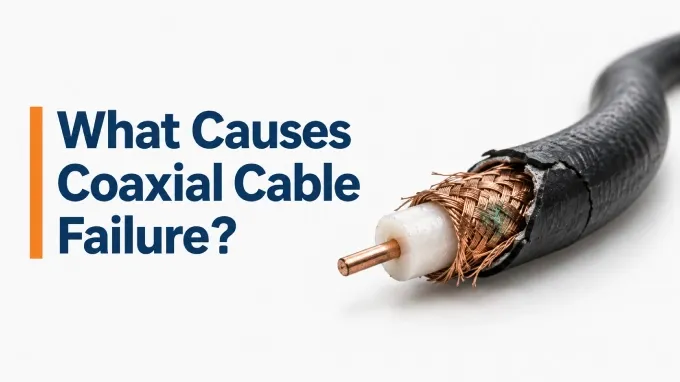
The causes of coaxial cable failure range from moisture ingress and corrosion to excessive bending, crushed dielectric material, damaged shielding, connector defects, vibration, and improper cable selection. Because these problems affect RF performance in different ways, effective coaxial cable troubleshooting starts by identifying the type of failure.
Start with the symptoms you can observe. The way a cable behaves often provides the first clue to what has failed. This is especially important when evaluating custom RF cable assemblies, since their specialized lengths, connectors, and configurations can introduce application-specific failure points.
These failure modes are often interconnected. For this reason, effective coaxial cable troubleshooting should not rely on a single test.
1. Excessive Signal Loss or Insertion Loss
.webp "Excessive Signal Loss or Insertion Loss")
Excessive signal loss occurs when a coaxial cable attenuates the RF signal more than expected for its length and operating frequency. It typically appears as reduced transmitted or received power and may worsen at higher frequencies. The first step naturally is to determine the causes of RF signal loss.
Possible Causes:
Moisture ingress or corrosion
Damaged or poorly installed connectors
Excessive cable length
Dielectric or conductor damage
Severe bending or crushing
Using a cable with excessive loss for the operating frequency
Likely Fix:
Measure insertion loss, preferably S21 with a VNA, across the intended frequency range and compare it with the cable specification. This helps distinguish actual cable damage from normal attenuation or incorrect cable selection. Then apply the fixes listed below.
Replace damaged or moisture-contaminated cable
Repair or re-terminate faulty connectors
Shorten the cable run where possible
Use a lower-loss cable for high-frequency applications
Replace cable that has been permanently crushed or deformed
2. Impedance Mismatch, High VSWR, and Poor Return Loss
.webp "Impedance Mismatch, High VSWR, and Poor Return Loss")
Impedance mismatch occurs when part of the coaxial cable assembly no longer maintains the intended characteristic impedance, typically 50 Ω or 75 Ω. This creates signal reflections, which appear as higher VSWR and poorer return loss and can reduce power transfer through the RF system.
Possible Causes:
Crushed or deformed cable
Bend radius violations
Dielectric deformation
Incorrect connector installation
Damaged connectors
Mixing 50 Ω and 75 Ω components
Manufacturing or termination defects
Moisture affecting dielectric properties
Likely Fix:
Measure S11, return loss, or VSWR with a VNA to confirm the mismatch. TDR or distance-to-fault testing can help locate a specific impedance discontinuity along the cable. Then apply the fixes listed below.
Replace crushed or permanently deformed cable
Reterminate or replace defective connectors
Use correctly matched cable and connector impedances
Correct bend-radius or installation issues
Replace moisture-damaged cable
3. Open-Circuit Coaxial Cable Failure
.webp "Open-Circuit Coaxial Cable Failure")
An open-circuit failure occurs when the electrical path through the center conductor or shield is interrupted. It can cause complete signal loss or, if the break is only partial, intermittent RF performance.
Possible Causes:
Conductor fracture
Flex fatigue
Failed solder joint
Poor crimp
Connector separation
Severe tensile stress
Likely Fix:
Use a continuity or resistance test to confirm the open circuit. TDR testing can help locate the break if it is somewhere along the cable rather than at the connector. Then apply the fixes listed below.
Re-terminate the connector if the break is at the termination
Repair or replace a failed solder or crimp connection
Replace the cable if the internal conductor is broken
Improve strain relief if excessive pulling or flexing caused the failure
4. Short-Circuit Failure
.webp "Short-Circuit Failure")
A short-circuit failure occurs when the center conductor makes electrical contact with the outer conductor or shield. This can cause complete signal loss or severe degradation in RF performance.
Possible Causes:
Poor connector installation
Stray braid strands
Crushed dielectric
Excessive mechanical deformation
Damaged connector
Manufacturing defect
Likely Fix:
Check center-to-shield resistance first to confirm the short. TDR or VNA measurement can help determine whether the fault is located at the connector or elsewhere along the cable. Then apply the fixes listed below.
Re-terminate the connector if the short is confined to the termination
Remove stray braid strands or correct connector assembly errors
Replace damaged connectors
Replace the cable assembly if internal deformation or dielectric damage caused the short
5. Intermittent RF Cable Assembly Failure
.webp "Intermittent RF Cable Assembly Failure")
An intermittent RF cable assembly failure occurs when the cable performs normally under some conditions but loses performance when moved, flexed, or vibrated. These failures can be difficult to diagnose because the assembly may appear normal during a static test.
Possible Causes:
Conductor fatigue
Partially broken shield
Loose RF connector
Poor crimp
Damaged solder joint
Repeated flexing
Vibration
Connector mating wear
Likely Fix:
Perform a controlled flex test while monitoring S11 or S21, inspect the connector interfaces, and compare performance with a known-good cable assembly to confirm the fault. Then apply the fixes listed below.
Replace fatigued or internally damaged cable
Reterminate or replace faulty connectors
Repair poor crimps or solder joints where appropriate
Improve strain relief
Reduce excessive flexing or vibration at the cable connection
6.Coaxial Cable Shielding Failure
.webp "Coaxial Cable Shielding Failure")
A coaxial cable shielding failure occurs when the cable still transmits RF but no longer adequately contains or rejects electromagnetic energy. This can lead to increased noise, greater EMI susceptibility, RF leakage, and degraded performance near interference sources.
Possible Causes:
Broken braid
Foil damage
Corrosion
Abrasion
Crushed cable
Poor connector shield termination
Incomplete 360° shield connection
Likely Fix:
Start with a physical inspection of the cable and connector terminations, then use appropriate RF or EMI testing to confirm whether shielding performance has degraded. Then apply the fixes listed below.
Replace cable with internal shield damage
Re-terminate connectors with poor shield contact
Repair or replace corroded connector components
Replace crushed or abraded cable
Ensure proper 360° shield termination at the connector
7. Moisture-Related Coaxial Cable Failure
.webp "Moisture-Related Coaxial Cable Failure")
Moisture can trigger several types of coaxial cable failure at once because it affects both the conductive and insulating parts of the assembly. Water ingress can increase attenuation, promote corrosion, degrade connectors, alter dielectric properties, and create impedance discontinuities that lead to poor return loss or intermittent RF performance.
Possible Causes:
Damaged or cracked cable jacket
Poor weather sealing
Loose or improperly installed connectors
Condensation
Long-term exposure to rain, humidity, or saltwater environments
Likely Fix:
Inspect the cable and connectors for signs of moisture, corrosion, or compromised sealing, then verify performance with insertion-loss and return-loss measurements. If water has penetrated the dielectric, replacement is usually more reliable than repair. Then apply the fixes listed below.
Replace moisture-contaminated cable
Replace or re-terminate corroded connectors
Restore proper weather sealing
Repair damaged jacket sections only if internal contamination has been ruled out
Use outdoor-rated cable and sealing methods in exposed installations
8. Thermal and High-Power Coaxial Cable Failure
.webp "Thermal and High-Power Coaxial Cable Failure")
Thermal failure occurs when a coaxial cable or connector operates beyond its safe power or temperature limits. Excess heat can increase insertion loss, destabilize performance, damage the dielectric, and eventually cause permanent failure.
Possible Causes:
RF power above the cable rating
Excessive connector loss
Poor VSWR causing localized power dissipation
Inadequate thermal management
Excessive ambient temperature
Likely Fix:
Check the cable’s power rating, connector condition, operating temperature, and VSWR to determine whether excessive heating is coming from overload, mismatch, or a lossy connection. Then apply the fixes listed below.
Use a cable assembly with a higher power rating
Replace damaged or high-loss connectors
Correct impedance mismatches that are increasing VSWR
Improve cooling or thermal management
Reduce exposure to excessive ambient temperature
9. Poor High-Frequency Performance
.webp "Poor High-Frequency Performance")
A coaxial cable may perform normally at lower frequencies but degrade as frequency increases. At higher frequencies, small discontinuities, connector defects, dielectric damage, and conductor losses become more significant, leading to higher insertion loss or poorer return loss.
Possible Causes:
Connector discontinuities
Cable deformation or tight bends
Excessive insertion loss
Dielectric damage
Poor termination
Cable or connector not rated for the operating frequency
Likely Fix:
Sweep the cable across its full operating frequency range with a VNA and review both S11 and S21. This helps identify whether the problem is caused by reflections, excessive transmission loss, or unsuitable component selection. Then apply the fixes listed below.
Replace damaged or deformed cable
Reterminate or replace defective connectors
Use cable and connectors rated for the required frequency
Shorten the cable run where practical
Upgrade to a lower-loss RF or microwave cable assembly
10. Phase or Amplitude Instability
.webp "Phase or Amplitude Instability")
Phase or amplitude instability occurs when the electrical performance of a coaxial cable changes with movement, temperature, or mechanical stress. This is especially important in microwave, test, radar, and other phase-sensitive RF systems where even small changes can affect accuracy or system performance.
Possible Causes:
Repeated cable flexing
Temperature cycling
Connector movement
Mechanical stress
Dielectric instability
Changes in conductor or shield geometry
Likely Fix:
Monitor phase and amplitude with a VNA while flexing the cable or changing its temperature. If the measurements shift beyond the required tolerance, the assembly is no longer stable enough for the application. Then apply the fixes listed below.
Possible fixes:
Replace mechanically fatigued cable
Improve strain relief and cable routing
Replace loose or unstable connectors
Use phase-stable cable for flexing applications
Use cable designed for the expected temperature range
How to Troubleshoot Coaxial Cable Failure
.webp "coaxial cable VNA troubleshooting")
A good troubleshooting process starts with simple physical checks, then moves to electrical and RF measurements if the problem is not obvious. Before testing, disconnect power where appropriate and confirm the cable type, connector type, length, and operating frequency.
Inspect the Cable and Connectors: Look for kinks, crushing, jacket damage, corrosion, loose connectors, bent contacts, and failed weather sealing. Pay particular attention to areas near connectors, cable ties, sharp bends, and entry points into equipment.
Check Continuity and Shorts: Use a multimeter to check center-conductor continuity from end to end and verify that the center conductor is isolated from the shield. Test the shield separately if possible.
Measure Insertion Loss and Return Loss With a VNA: Use S21 to check transmission or insertion loss and S11 to evaluate reflections and return loss. Compare the results from RF test equipment with the cable manufacturer’s specifications or with a known-good cable of the same type and length.
Use TDR Testing: TDR testing coaxial cables can help locate opens, shorts, and impedance discontinuities by measuring reflected pulses and estimating the distance to the fault. Set the correct cable velocity factor in the TDR so the distance calculation is accurate.
Test Across the Actual Operating Frequency Range: Always test across the cable’s intended frequency band. Check for increasing insertion loss, sharp reflection peaks, or unstable readings as frequency rises. If the cable is used outdoors, repeat testing after movement, temperature changes, or exposure to moisture.
Compare With a Known-Good Cable: When possible, temporarily replace the suspected cable with a cable known to work correctly. If the system immediately returns to normal, the original cable or one of its connectors is likely defective.
Should You Repair or Replace a Failed Coaxial Cable?
Some coaxial cable failures can be corrected at the connector or termination, while internal cable damage usually requires replacement. Use the type and location of the fault to guide the decision.
How to Prevent Coaxial Cable Failure
Preventing coaxial cable failure starts with correct cable selection and careful installation. The cable should match the system’s impedance, frequency range, power requirements, and environmental conditions.
Follow the specified minimum bend radius
Use proper strain relief near connectors
Apply the correct connector torque
Weather-seal outdoor connections
Support cables to prevent crushing or excessive movement
Use the correct 50 Ω or 75 Ω impedance
Choose cable and connectors rated for the operating frequency
Stay within the cable’s power-handling limits
Use materials suitable for temperature, moisture, UV, and chemical exposure
FAQ
Discussion (0)
Be the first to comment.
.webp)