N-Type Connector Torque: Recommended Values and Installation Guidelines

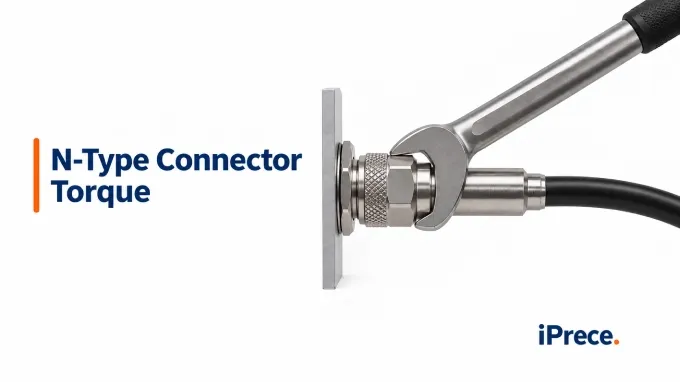
iPrece lists 8–12 in-lb (approximately 0.90–1.36 N·m) as a reference mating-torque range for N-Type connectors. This is not a universal specification: the instructions for the specific connector, cable assembly, adapter, or equipment port always take priority. The guidance below concerns mating two N-Type interfaces—not mounting or assembling the connector.
What Mating Torque Should You Use for an N-Type Connector?
Use the mating torque specified for the exact components being connected. Check the component datasheet, installation drawing, or equipment manual first. If no part-specific value is available, consult the manufacturer’s guidance for that connector series; use generic torque tables only as contextual references.
Both sides of the connection matter. For example, when connecting a cable to an instrument, check the instructions for the cable connector and the instrument port. If the specified values conflict, do not average them or automatically select the higher value. Confirm the approved torque for that pairing with the relevant manufacturer.
Before interpreting any published value, identify which threaded part it applies to:
Operation | What is tightened | Where to find the specification |
Mating torque | The coupling nut joining two RF interfaces | Component or equipment mating instructions |
Mounting torque | A bulkhead retaining nut or flange-mounting screws | Connector mounting drawing and hardware instructions |
Assembly torque | A cable clamp, rear nut, backshell, or other termination component | Assembly instructions for the specific connector and cable |
.webp)
These values can differ substantially. GCT, for example, specifies 8–10 in-lb for mating its brass N connectors but 30–35 in-lb for mounting the listed N bulkhead connector to an equipment case. Applying the mounting value to the coupling nut would confuse two separate mechanical operations.
Published recommendations also vary among connector and equipment manufacturers; this is why the N-Type interface designation alone does not establish one tightening value. Connector design, material system, coupling construction, and the manufacturer’s validated installation requirements may all affect the recommendation. Do not combine the values into a broader “acceptable” range or select torque from appearance or assumed body material alone.
Also distinguish recommended working or mating torque from any separately stated maximum or proof torque. A proof-torque rating is a qualification limit, not an installation target. When specifying custom RF cable assemblies, record the connector part numbers and applicable mating instructions with the assembly documentation so installers can identify the correct requirement.
How Do You Tighten an N-Type Connector Correctly?
Start the connection by hand, then use the tool and tightening method specified for the particular connector. When a torque wrench is required, it should be calibrated for the specified value or operating range and fitted with the correct head for the coupling nut. N type connectors do not all use the same wrench size.
Connector design also determines whether a wrench is appropriate. Use wrench flats when provided. Some manufacturers permit finger-tightening for knurled coupling nuts without flats; others specify a dedicated non-slip tool. Follow the applicable instructions rather than gripping a knurled nut with pliers.
Confirm the interfaces and mating specification. Verify that the connectors are intended to mate, including their impedance and any manufacturer-specific compatibility requirements.
Inspect and prepare both connectors. Check the center contacts, outer-conductor mating surfaces, threads, and any specified seals. The coupling nut should turn smoothly. Clean the interfaces only as instructed by the manufacturer, and do not mate a connector with damaged contacts, deformed threads, worn plating, or embedded debris.
Position and support the cable. Route the N type cable assembly so the wrench can reach the coupling nut without forcing the cable into a sharp bend. Support the cable’s weight so it does not pull the two interfaces out of alignment during tightening.
Align the interfaces and start the connection by hand. Hold the connector axes in line and rotate only the coupling nut. The threads should engage smoothly. If the nut binds, feels rough, or requires force before the interfaces are seated, stop and inspect the alignment and threads.
Prevent the connector bodies from rotating. Hold the equipment or counter-hold the connector body at its designated flats when required. Do not rotate the cable, connector body, or equipment port to advance the connection; the coupling nut should pull the aligned interfaces together.
Apply the specified mating torque. Seat the wrench fully on the coupling nut and apply smooth, steady force at the designated part of the handle. Stop at the first click, break, or other specified torque indication. Do not continue pulling or repeat the operation merely to confirm that the wrench has been released.
Inspect the completed installation. Confirm that the connectors are properly seated, the cable remains supported, and no bending load is acting on the interface. Complete any inspection, torque-recording, or installation-verification step required for the equipment or assembly.
ntypetorque (2).webp
Alt:
The essential distinction throughout the procedure is simple: turn the coupling nut while preventing the connector bodies and cable from twisting.
How Do Under-Torque and Over-Torque Affect RF Performance and Reliability?
Correct mating torque helps seat and retain the interface as designed. Too little torque may leave the connection inadequately seated, while excessive torque may damage its geometry or surfaces. Coupling torque does not directly determine every internal contact force, but an improperly seated or damaged interface can disturb both contact integrity and the RF transition.
Condition | Mechanical concern | Possible RF and reliability consequences |
Under-torque | Inadequate seating or retention; greater susceptibility to movement or loosening | Unstable contact, intermittent behavior, mismatch, or poor connection repeatability |
Over-torque | Deformed threads or mating surfaces and other design-dependent damage | Persistent mismatch, difficult mating, damaged components, or reduced service life |
Both conditions can produce an impedance discontinuity. A worsening match appears as higher VSWR and lower positive return loss. On a VNA displaying S11 magnitude in decibels, the same deterioration appears as a less-negative value—for example, movement from −20 dB toward −10 dB. These are different representations of reflection, not separate effects of torque.
Torque alone does not predict a specific change in VSWR or return loss. The result also depends on the connector design, condition, frequency, mating counterpart, termination, and surrounding transmission path. Increasing torque beyond the specified value is therefore not a valid way to improve a poor measurement.
If performance is worse than expected:
Disconnect and inspect the interfaces, then remate an undamaged connection using the preceding procedure.
Verify performance with an appropriate calibrated setup across the required operating band, keeping cable routing and termination conditions controlled.
If the problem remains, investigate the connector, cable termination, mating port, adjacent cable, and measurement setup instead of applying additional torque.
Correct mating and adequate cable support also reduce opportunities for movement at the interface, but long-term connector vibration resistance depends on the complete connector, mounting, termination, and cable-support arrangement. A satisfactory static RF measurement confirms the connection only under the conditions of that test; it does not by itself establish stability during vibration.
FAQ
Discussion (0)
Be the first to comment.
.webp)