How to Measure the Capacitance of a Coaxial Cable?

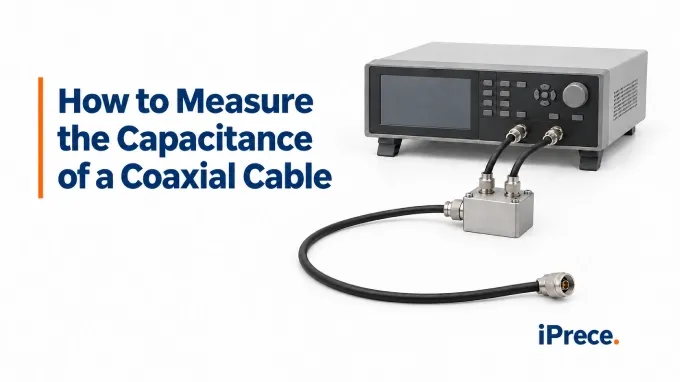
Measure between the center conductor and shield at one end while leaving the far end open. Compensate the test fixture at the cable connection plane, then use a test frequency at which the cable remains electrically short enough for the required accuracy. Divide the valid total capacitance by the measured cable length to obtain capacitance per unit length. Electrically long cables require a transmission-line method such as TDR instead.
1. Choose the Instrument and Define What the Test Includes
Use an LCR meter or impedance analyzer that provides selectable test frequencies, adequate accuracy at the expected impedance, and OPEN/SHORT fixture compensation. A basic capacitance meter may display a value, but it may not reveal whether its test frequency, measurement range, or residual fixture capacitance supports the required accuracy.
Define the device under test before connecting it:
Bare cable: The result represents the capacitance of the measured cable length, subject to end-preparation effects.
Connectorized cable: The reading includes the cable and both terminations.
Assembly with additional components: DC blocks, attenuators, surge protectors, or other internal networks can prevent the reading from representing cable capacitance alone.
For custom RF cable assemblies, decide whether the acceptance requirement applies to the complete assembly or to the bulk cable’s capacitance per unit length. Record the physical length and its endpoints accordingly. Connector-to-connector length may differ from the dielectric-filled cable length used in a bulk-cable specification.
Use a connector adapter or compact breakout fixture that makes repeatable contact without introducing long exposed leads. Select Cp or Cs based on the expected impedance at the test frequency and the instrument manufacturer’s guidance, and record the selected equivalent-circuit mode. If Cp and Cs differ materially under identical conditions, investigate the cause rather than selecting whichever value appears closer to the specification.
2. Select a Test Frequency That Gives a Valid Capacitance Reading
Use the frequency specified for the cable when one is given. Capacitance limits apply under stated test conditions. If no frequency is specified, evaluate practical settings such as 1 kHz and 10 kHz instead of treating either as universally correct.
Balance electrical length against instrument sensitivity. Lowering the frequency makes the cable electrically shorter, improving the lumped-capacitor approximation. It also increases capacitive impedance, which can move the measurement into a less accurate range of the instrument. Check the meter’s accuracy specification at the expected impedance, not just its nominal capacitance range.
Screen each candidate frequency against the cable’s propagation delay. Obtain propagation velocity, , from the specified coaxial cable velocity factor, or from a measured delay when available. Calculate the one-way delay and electrical length:
Here, is one-way delay, is cable length, is propagation velocity, f is test frequency, and is one-way electrical length in radians.
Even below the first resonance, distributed-line effects can cause the equivalent capacitance reported by an LCR meter to differ from the cable’s actual distributed capacitance. For an ideal, uniform, lossless cable with an open far end, the open-line input-impedance model gives:
is the apparent capacitance, and is the distributed capacitance per unit length multiplied by cable length. Use this relation only as a model-based screening calculation.
For a 100 m cable with an assumed :
These values are calculated examples, not measured cable results. Conductor and dielectric losses, distributed resistance, leakage, and instrument uncertainty can produce additional error.
Accept the frequency only if the complete uncertainty remains suitable. Compare results at nearby usable frequencies and examine dissipation factor or phase for evidence that the simple capacitive model is deteriorating. Agreement within the uncertainty budget supports the result, although it cannot reveal a constant fixture error. If no available frequency satisfies the accuracy requirement, the meter may still measure input impedance correctly, but interpreting its displayed equivalent capacitance as the cable’s total capacitance is invalid. Use a TDR or transmission-line extraction method instead.
3. Compensate the Fixture and Measure the Open-Ended Cable
Compensate the complete fixture at the physical plane where the cable’s near end will connect.
Set the selected test frequencies, AC test level, and Cp or Cs measurement mode. Disable DC bias unless the test specification requires it.
Install the leads, adapters, and breakout fixture that will remain in the measurement. Identify the cable connection point as the reference plane.
With the cable removed, perform the instrument-specified OPEN compensation at that plane. Keep the contacts and leads in their intended measurement positions without allowing the terminals to touch.
Apply the appropriate low-inductance short at the same plane and perform SHORT compensation. Remove the short without changing lead spacing, adapter orientation, or cable routing.
.webp)
Fixture OPEN compensation and leaving the cable’s far end open are separate operations. The first characterizes the empty fixture before connecting the DUT; the second defines the cable termination during measurement. Performing OPEN compensation with the cable attached can remove much of the capacitance being measured.
A simple zero or fixed subtraction corrects only a limited residual-capacitance model. It is not automatically equivalent to full OPEN/SHORT fixture compensation.
Connect the Center Conductor and Shield, Leaving the Far End Open
After compensation, isolate the cable from all other equipment and discharge any stored charge before connecting it to the meter.
Connect the near end at the established reference plane:
For a four-terminal fixture, join each current and potential terminal at the same near-end measurement plane. These are the DUT connections. The fixture guard or instrument shield controls stray coupling and must be connected according to the fixture design; it does not replace the LO connection to the cable shield.
.webp)
At the far end, leave the center conductor and shield unconnected to each other and to any equipment. Do not install a short, 50 Ω load, or other termination, because it changes the measured network.
Arrange the cable and fixture so they remain stationary. Keep hands and nearby conductive objects away from exposed contacts, then wait for a stable reading.
Record the capacitance, test frequency, AC level, Cp or Cs mode, and dissipation factor or phase when available. Disconnect and reconnect the near end once to assess connection repeatability, then collect the frequency-comparison readings selected earlier.
4. Calculate Capacitance per Meter or Foot and Assess the Result
Use the total capacitance for the tested cable or assembly as measured. To compare cable samples of different lengths, calculate capacitance per unit length using the cable-only capacitance and the physical length defined earlier:
Here, C' is capacitance per unit length, is the measured cable capacitance after accounting for fixture and endpoint effects, and \ell is the measured cable length. Convert coaxial cable capacitance per meter to capacitance per foot with:
For example, a 5.00 m cable sample with a measured capacitance of 500 pF gives:
Round the result only to the precision supported by the measurement uncertainty. This example assumes that the lumped measurement is valid, fixture effects have been removed, and connector or prepared-end contributions are either negligible or separately accounted for.
Dividing the total capacitance of a complete connectorized assembly by its cable length does not necessarily produce the bulk cable’s capacitance per unit length. Connectors, exposed dielectric, and termination geometry add endpoint capacitance that does not scale with cable length. The resulting bias is usually more significant for short assemblies.
Use TDR or Transmission-Line Extraction When a Lumped Reading Is Insufficient
When no LCR test frequency meets the required uncertainty, measure the cable’s propagation delay and characteristic impedance rather than interpreting an equivalent-capacitance display as total cable capacitance.
.webp)
For a uniform, approximately lossless and nondispersive cable, use this TDR procedure:
Establish the TDR reference plane at the cable connection. Apply the instrument’s normalization or calibration procedure so the launch lead and adapter delay are excluded from the cable measurement.
Connect the cable with its far end open. Inspect the trace after the launch discontinuity and identify a sufficiently uniform region before the open-end reflection. Use this region to determine the cable’s measured coaxial cable characteristic impedance.
Measure the elapsed time from the cable reference plane to the open-end reflection. If the TDR reports the pulse’s travel to the open end and back, that interval is the round-trip reflection time. Divide it by two to obtain the one-way cable delay.
Use the measured characteristic impedance and one-way delay to infer capacitance per unit length from a transmission-line model; TDR does not measure capacitance directly:
Here, C' is capacitance per unit length, is the one-way cable delay, is the measured characteristic impedance, is physical cable length, and is propagation velocity. The relationship assumes a sufficiently uniform line for a single impedance and propagation velocity to represent the measured section.
Use the measured characteristic impedance rather than a nominal 50 Ω value whenever it is available.
For materially lossy, dispersive, or nonuniform cables, or traces without a usable constant-impedance region, use calibrated VNA measurements over the relevant frequency range and fit an appropriate transmission-line model. Transmission phase and RF group delay can show whether propagation delay varies across the measured frequency range. Capacitance extracted at RF may differ from a low-frequency LCR result because dielectric properties and loss can vary with frequency. Report the extraction method and frequency range with the result.
FAQ
Discussion (0)
Be the first to comment.
.webp)
.webp)